

Create a Mobile App with Thunkable
Course Description:
Step into the world of app development by designing and creating your own mobile application. This course covers the basics of design, user experience, and coding, culminating in a functional app that students can use.
Take Home Element:
Custom Mobile App (Android Installable APK / iOS Viewable via Thunkable app)
What You Will Learn
User Interface Design
Students learn how to select complementary colors using the color wheel and appropriate fonts to create a recognizable and emotionally effective mobile app brand.
Event-Driven Programming
Students use event handlers, such as When Button Click or When Screen Opens, and conditional logic including If/Then/Else statements to create interactivity and control app flow.
App Lifecycle Management
Students navigate the complete process of app development, from initial project setup and component design to testing, debugging, and deploying the finished application to a mobile device.
State Standards Alignment
This course aligns with core principles across Computer Science, Arts, and Engineering Design, including:
CSTA 1A-AP-14: Debug programs to ensure they run as intended
CSTA 1B-AP-09: Create programs that use variables to store and modify data for scores, counters, or image sheets
ISTE 4.a: Students know and use a deliberate design process including Design, Develop, Debug, and Deploy
CCSS-M MP.4: Model with mathematics using variables to track game scores
NGSS ETS1.A: Define and delimit engineering problems by setting design constraints for a mobile app
These coding classes for kids serve students in the Aurora, Oswego, and Naperville communities.
Skills Gained
- Programming fundamentals using event-driven logic
- User interface and visual design skills
- Problem-solving and debugging techniques
- Understanding app lifecycle and deployment processes
- Critical thinking and iterative design
Design & 3D Print in Multicolor
Course Description:
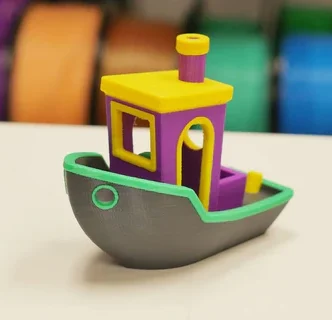
This STEM course teaches Computer-Aided Design (CAD) using TinkerCAD and explores three professional methods for multi-color 3D printing. Students learn to create complex 3D models and master techniques such as manual filament swaps, Automated Material Systems (AMS), and post-print assembly to produce multi-colored functional or decorative objects.
Take Home Element:
Multicolor Name Tag, Thingiverse print, and Game Character
What You Will Learn
CAD Design
Students gain mastery of the TinkerCAD interface for creating multi-layered designs, using holes for cutouts, and grouping objects to create complex 3D geometry.
Additive Manufacturing Techniques
Students learn to use slicer software, including Cura and Bambu Studio, to schedule print pauses for filament swaps and design objects for multi-part post-print assembly.
Engineering for Efficiency
Students analyze print time and filament usage, including the waste generated by AMS systems, to make informed decisions that balance aesthetics and cost.
State Standards Alignment
This course aligns with core principles across Engineering Design, Technology, and Mathematics, including:
- NGSS ETS1.B: Developing Possible Solutions (iterating CAD design for printability)
- NGSS K-2-ETS1-3: Analyze data from tests to determine similarities and differences (comparing AMS vs. filament swap efficiency)
- ISTE 4.a: Students use a deliberate design process for generating ideas (using TinkerCAD)
- CCSS-M MP.5: Use appropriate tools strategically (using TinkerCAD and Cura)
- ISTE 5.c: Breaking down a large problem into smaller parts (designing models for multi-part assembly)
These 3D printing classes serve students in the Aurora, Oswego, and Naperville communities.
Skills Gained
- TinkerCAD for 3D modeling and design
- 3D printing techniques
- Using slicer software for print planning
- Problem-solving and engineering decision-making
- Analyzing print efficiency, time, and material usage